Virtual Machine Recovery Heroes.
VBK Repair could Help System Administrators to retrieve Files from corrupted Veeam backups.
QUICK STARTVBK Repair could Help System Administrators to retrieve Files from corrupted Veeam backups.
QUICK STARTVeeam backups can sometimes exhibit a particular issue related to the corruption of their internal metadata. In such cases, a backup job created with the free version of Veeam Desktop cannot be successfully extracted by the user.

When using Veeam's official tool, Veeam Extractor, the following error message is displayed:
Out of the vector bound. Record index: [18446744073709551615]. Vector length: [152514]
--tr:Failed to export block restore descriptor. Storage block ID: [18446744073709551615].
--tr:Cannot apply patches stored in folder [HostFS://Job.2026-09-08T155129.vbk[6745a759-2205-4cd2-b172-8ec8f7e60ef8 (4de9dd80-157d-11e0-889d-6045cba0d5c5)]].
--tr:Failed to build restore point.
Failed to restore file from local backup:: VFS link: [summary.xml]:: Target file: [MemFs://temp_{a90ba303-41bb-4e9a-b145-86480265bf53}]::
--tr:Failed to list items in the storage [Job 2026-09-08T155129.vbk].
Assuming Record index: "18446744073709551615" is just a 64 bit bad pointer, we could relate this error to a metadata corruption on some Slot.
If you have tried every possible method to extract the backup using Veeam and still cannot access or view its contents, you can try VBK Studio.
VBK Studio provides a comprehensive analysis dashboard designed to help you understand the nature and extent of the corruption affecting the VBK file and determine whether the data can be successfully recovered.
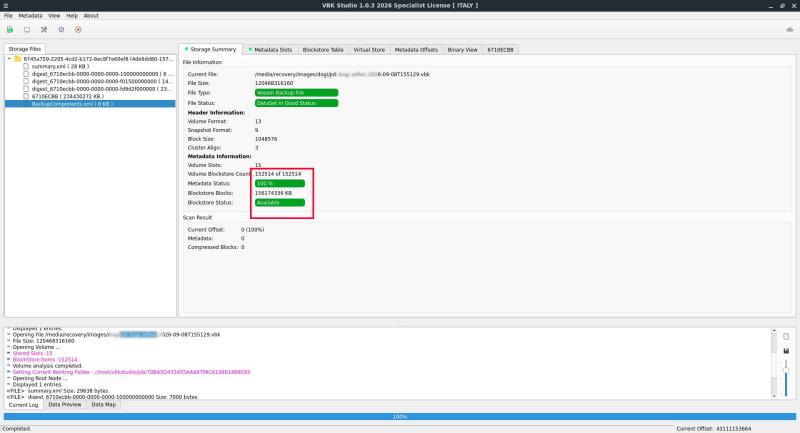
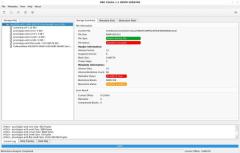
When opening a corrupted VBK file with VBK Studio, a summary is displayed showing the detected quality and integrity of the internal metadata.
It is also important to evaluate the percentage of BlockStore data detected and compare it with the value reported in the VBK file header.
This comparison provides an important indication of the actual condition of the backup and can help determine whether the underlying data is potentially recoverable.
After reviewing the Veeam File Summary, you can check the status of the slots containing the metadata. The system will automatically calculate the status of both the primary slots and the backup slots.
Although having just one valid slot version is sufficient, having both slot locations available provides additional reassurance regarding the quality and reliability of the final recovery result.
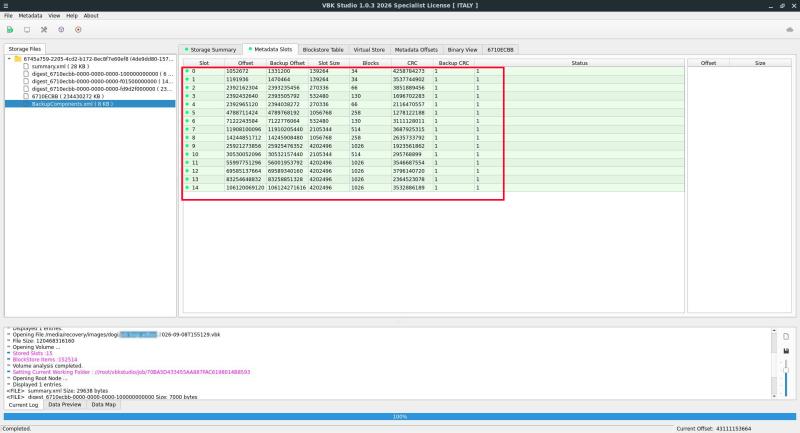
In the case above, it is clear that the vbk file is of excellent quality, and there are no indications suggesting an incorrect copy, a corrupted file, or a file that has been overwritten.
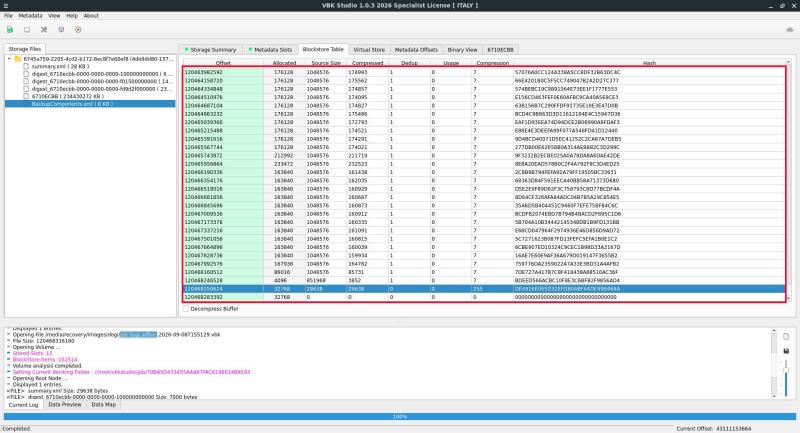
After verifying the metadata integrity and their checksums, it is still essential to examine the BlockStore.
Note:
The BlockStore is the core of a Veeam backup. It defines where the data blocks are located, their compression status, and their size on disk.
A damaged, interrupted, or incomplete BlockStore can result in partial data loss or make it impossible to extract the contents of the backup.
If you are comfortable with the values reported by VBK Studio, you can proceed to analyze the contents of the backup by expanding the files and folders in the File System Tree placed on the left.
It is common for Veeam file-backup jobs to use mnemonic, hash-like names for their files. The main files can usually be easily identified by their size.
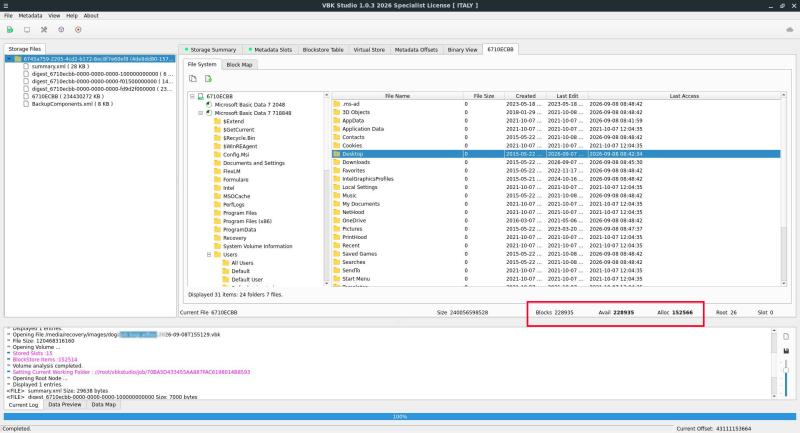
ALWAYS verify the file build status and the blocks that have been correctly detected.
If the number of blocks assigned to a file is identical to the number of blocks available, you can be confident that the file structure is intact.
If the file system, including its files and folders, is visible and navigable, your backup is safe and you can proceed with checking individual files and folders or extracting the entire volume.
The analysis performed by VBK Studio provides a comprehensive overview of the condition of the Veeam backup, making it possible to assess the integrity of its metadata, BlockStore, file structure, and available data blocks.
A positive result across these checks provides strong evidence that the backup structure is intact and that the data is potentially recoverable, even when the standard Veeam tools are unable to open or extract the backup.
In particular, the consistency between the BlockStore information reported in the file header and the blocks actually detected, together with valid metadata slots and checksums, represents a strong indication of the overall quality of the backup.
If the File System Tree can be successfully navigated and the files and folders are correctly identified, the backup can generally be considered structurally accessible. At this stage, individual files and folders can be verified and tested, or the complete volume can be extracted.
VBK Studio therefore provides the information required to move from a simple “backup cannot be opened” situation to a detailed technical assessment of what is actually present inside the VBK file and whether recovery is feasible.
This content explains the basic operating principles of VBK Recovery and the types of cases that can be handled with this powerful tool.

Whenever a Veeam backup file suffers from header corruption or partial metadata damage, Veeam typically returns the error message: All instances of the storage metadata are corrupted. This error may appear alarming, but it does not necessarily mean that all backup data has been lost. In this article, we explain what this message actually means, how to diagnose the underlying issue, and the availab

In this case, we address the recovery of a SQL Server backup affected by a DEADLOCK 2026 ransomware, using only the blocks embedded in the incremental VIB file.

If veeam Extract process does interrupt suddendly with Error Failed to export block restore descriptor could be related to a slight metadata corruption. In most of such cases data are still in perfect shape.
Whenever a Veeam backup file suffers from header corruption or partial metadata damage, Veeam typically returns the error message: All instances of the storage metadata are corrupted. This error may appear alarming, but it does not necessarily mean that all backup data has been lost. In this article, we explain what this message actually means, how to diagnose the underlying issue, and the availab

This article discusses the techniques for generating a single disk image from complex RAID configurations and LVM2 volumes typically deployed on QNAP NAS systems.