Virtual Machine Recovery Heroes.
VBK Repair could Help System Administrators to retrieve Files from corrupted Veeam backups.
QUICK STARTVBK Repair could Help System Administrators to retrieve Files from corrupted Veeam backups.
QUICK STARTA typical Veeam backup corruption usually results in a very generic error message.
All instances of the storage metadata are corrupted.--tr:Failed to load metastore--tr:Failed to load key sets metadata.Failed to load storage key sets.--tr:Failed to retrieve key sets from encrypted storage.
But what does it actually mean? Have I really lost all my data?
In most cases, the error indicates metadata corruption and the inability to access or use certain metadata table slots.
To ensure maximum reliability and data structure integrity, Veeam backup files include an internal redundancy mechanism that maintains backup copies for each individual metadata slot.

A Veeam backup can become corrupted for a variety of reasons, including RAID failures, disk block corruption, SSD corruption or failure, ransomware or other cyberattacks, or accidental deletion. Corruption may also occur after an unsuccessful data recovery attempt following accidental deletion or intentional sabotage.
Veeam includes an excellent command-line utility that allows backup files to be extracted independently of the Veeam Backup & Replication environment.
./extract all-linuxD2026-06-08T222629_A3D1.vbk
All instances of the storage metadata are corrupted.--tr:Failed to load metastore--tr:Failed to load key sets metadata.Failed to load storage key sets.--tr:Failed to retrieve key sets from encrypted storage.
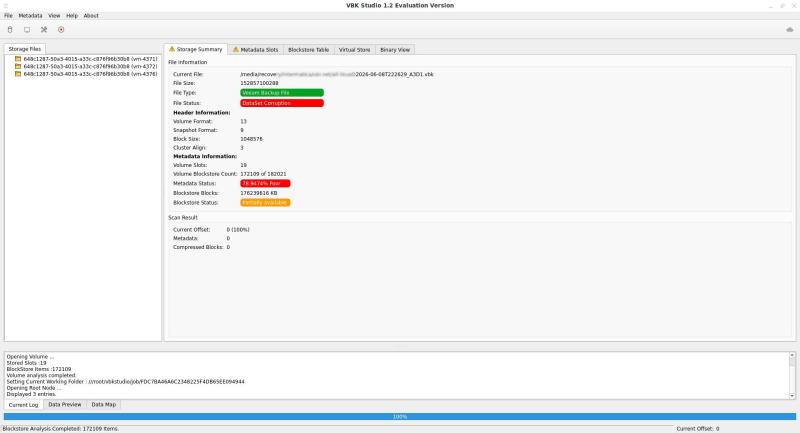
Open File in VBK Studio and give a look to storage summary view.
In this VBK File we found a corruption of metadata and most of blockstore storage available.
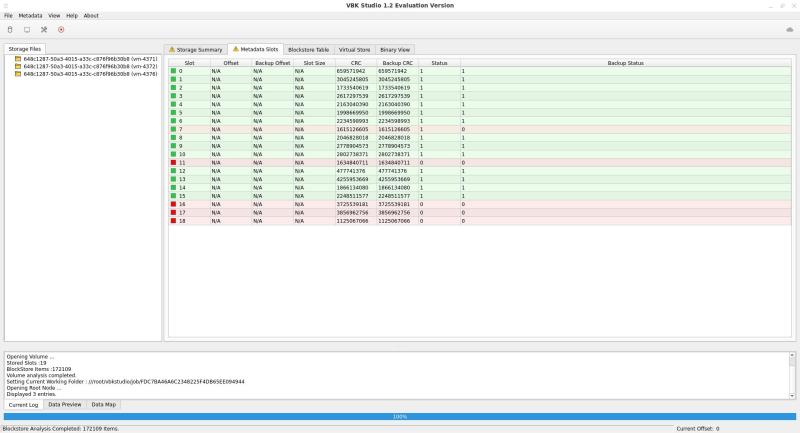
By analyzing the slot table, it is evident that some entries are corrupted in both the primary metadata copy and the backup copy.
As a result, the Veeam Extractor utility returns the following error messages:
--tr:Failed to load metastore
--tr:Failed to load key sets metadata.
These errors indicate that the extractor is unable to load the metadata structures required to access the backup contents because both copies of the affected metadata slots are corrupted.
It is, however, possible to assess the integrity of the available metadata nodes and determine whether the backup data can still be extracted despite the presence of metadata corruption.
Next, open the Storage Tree and select the virtual machine you want to recover, in this case CENTOS Server.
The allocation statistics are encouraging: the backup contains a healthy block store and a substantial number of allocated blocks, indicating that there is a good chance of successfully extracting the virtual machine data despite the metadata corruption.
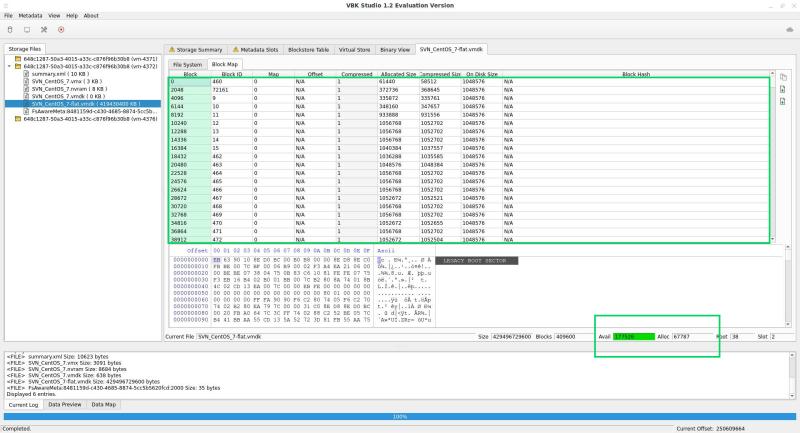
At this stage, you can assess the integrity of the blocks belonging to the target virtual machine and proceed with either exporting the virtual disk or extracting individual files.
Metadata slot corruption can affect data integrity in several ways.
The first possibility is that some data blocks are corrupted and fail the CRC integrity check. As a result, the recovered virtual disk image may contain corrupted file system structures, damaged files, or inaccessible directories.
Veeam backup corruption can occur for a variety of reasons. When metadata is damaged, the standard Veeam tools may be unable to access the backup and typically report the generic error:
"All instances of the storage metadata are corrupted."
This message does not necessarily mean that the backup data is unrecoverable. With VBK Studio, it is possible to evaluate the actual condition of the metadata, determine whether the corruption affects critical metadata nodes, and assess whether the backup still contains sufficient information to support a successful partial or even complete data recovery.
By analyzing the metadata structures, block allocation, and storage tree integrity, VBK Studio provides a much more accurate assessment of the backup's recoverability than the generic error message alone.
This content explains the basic operating principles of VBK Recovery and the types of cases that can be handled with this powerful tool.

We are analyzing a cyberattack carried out by the Team NightSpire group that targeted a Microsoft Hypervisor and the related backups stored on Synology NAS systems. The attack was executed with absolute precision, leaving no possibility of intervention through traditional recovery methods.

This article presents a method for extracting and restoring SQL Server backups from a corrupted Veeam backup set using exclusively the delta information contained in the VIB file.

If veeam Extract process does interrupt suddendly with Error Failed to export block restore descriptor could be related to a slight metadata corruption. In most of such cases data are still in perfect shape.

In this case, we address the recovery of a SQL Server backup affected by a DEADLOCK 2026 ransomware, using only the blocks embedded in the incremental VIB file.
In this case, we address the recovery of a SQL Server backup affected by a DEADLOCK 2026 ransomware, using only the blocks embedded in the incremental VIB file.
If veeam Extract process does interrupt suddendly with Error Failed to export block restore descriptor could be related to a slight metadata corruption. In most of such cases data are still in perfect shape.

Whenever a Veeam backup file suffers from header corruption or partial metadata damage, Veeam typically returns the error message: All instances of the storage metadata are corrupted. This error may appear alarming, but it does not necessarily mean that all backup data has been lost. In this article, we explain what this message actually means, how to diagnose the underlying issue, and the availab

This article discusses the techniques for generating a single disk image from complex RAID configurations and LVM2 volumes typically deployed on QNAP NAS systems.