Virtual Machine Recovery Heroes.
VBK Repair could Help System Administrators to retrieve Files from corrupted Veeam backups.
QUICK STARTVBK Repair could Help System Administrators to retrieve Files from corrupted Veeam backups.
QUICK STARTVIB files represent incremental restore points built upon the full backup stored in the .VBK file. They contain only the changed data blocks (delta blocks) generated since the previous restore point in the backup chain.
In a backup chain, the loss of an incremental backup file and its related restore points breaks the chain consistency, making it impossible to restore the latest available version of the protected data.
A notable aspect of VIB files is the management of block metadata within the incremental datastore. Their internal organization closely mirrors that of a full backup, except that each FIB (File In Block) record includes an additional 64-bit block mapping field that identifies the exact target block address in the source storage from which the incremental delta was generated.
Incremental blocks stored in VIB files are generally insufficient for direct SQL Server database recovery because they represent only the sectors modified between backup intervals.
Nevertheless, when the protected system routinely generates local SQL Server .BAK backup files, the latest incremental restore point is likely to contain all data blocks associated with the most recent backup file, along with the corresponding NTFS MFT metadata required to reconstruct its physical allocation, fragmentation map, and storage location.
Consequently, under these conditions, it is possible to recover a SQL Server database using only the sectors and metadata contained within the latest available VIB file, without requiring the complete backup chain.
This case study focuses on the recovery of a VIB file that was retrieved in its entirety from a QNAP backup repository compromised by a ransomware attack.
The malware encrypted both the virtual machines and the entire set of VBK and VIB backup files. Nevertheless, forensic analysis of the QNAP file system journal enabled the recovery of several intact .VIB files that had previously been removed by the backup retention policy before the ransomware attack occurred.
In cases where the QNAP system is deployed on a single disk or RAID 1 configuration, a direct examination of the LVM partition is feasible, provided that no LVM tiering or segmented logical volume structures are present.
A correct forensic analysis requires a single consolidated disk dump, obtained either from an individual physical drive or from a raw disk image such as .dd or .dsk format.
If the NAS configuration is complex, involving RAID, SPAN, TIER, or THIN provisioning, it is necessary to use a virtual reconstruction system of the original EXT4 data stream in order to generate a linear disk image.
Several professional tools are available to perform a linear dump of the original partition; however, these are typically intended for specialists and may be complex to operate.
A relatively straightforward approach for a QNAP user is to perform a raw DD dump via SSH shell and create a clone or disk image of the primary storage by connecting a high-capacity external drive through the USB interface.
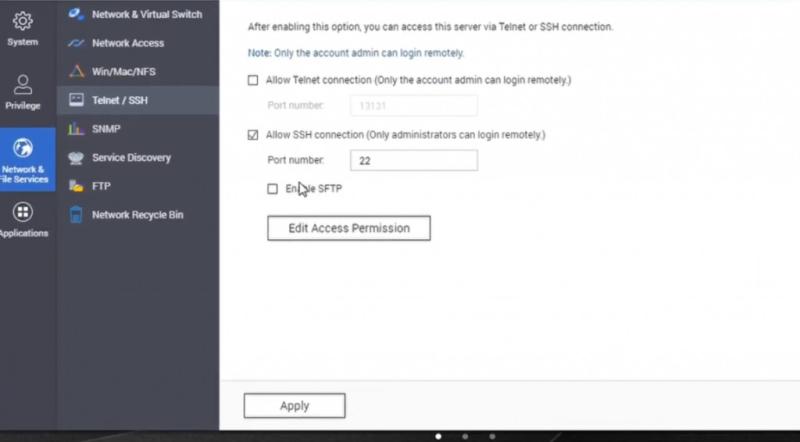
The process consists of enabling SSH access through QNAP Manager and establishing a connection using PuTTY or a Linux-based system connected to the same network as the QNAP device.
A complete guide for qnap storage acquisition could be found here
Once a single consolidated image file has been created, it can be examined using different categories of tools, including commercial, freeware, and open-source solutions, depending on the required analysis workflow.
A notable aspect of data recovery operations on deleted Linux partitions is that different tools often yield varying results.
This is due to the fact that, in Unix-like systems, inode deletion is inherently a permanent operation. Consequently, the only viable mechanism for attempting to reverse filesystem-level deletions—such as those that may occur during a cyberattack—is the use of transaction records stored within the EXT4 filesystem journal.
Among the best software tools for handling file recovery, deletion, and file system corruption on Linux EXT4 file systems, we can list:
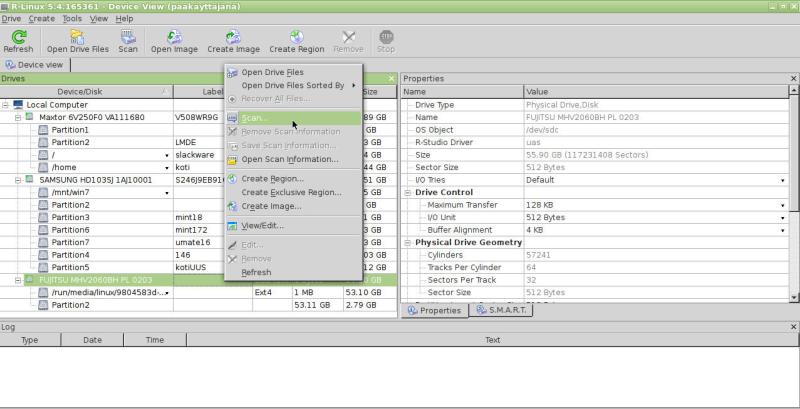
R-Linux Main Screen Window
All of these tools can be used with a high degree of effectiveness to locate and recover deleted inodes on EXT4 file systems, as well as to recover fragmented or intact VIB and VBK backup files from a QNAP system that has become corrupted or has been affected by a ransomware attack.
Although recovery results are not guaranteed for all available files, it is still worthwhile to attempt an exhaustive analysis of all available occurrences and to evaluate them in order to assess the quality and integrity of the recovered inode or data node.
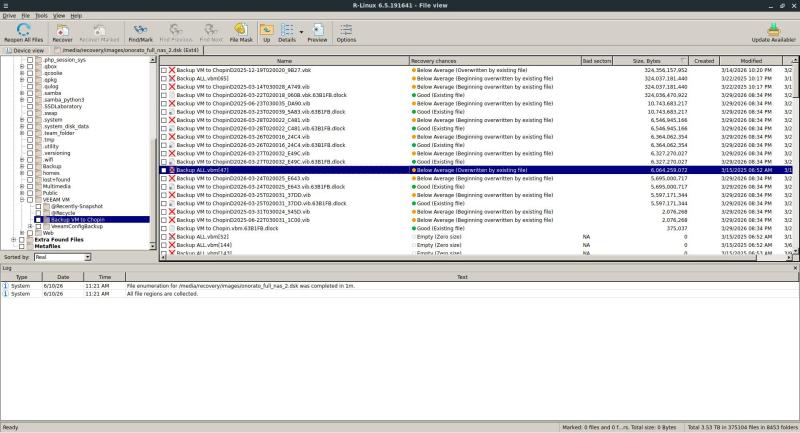
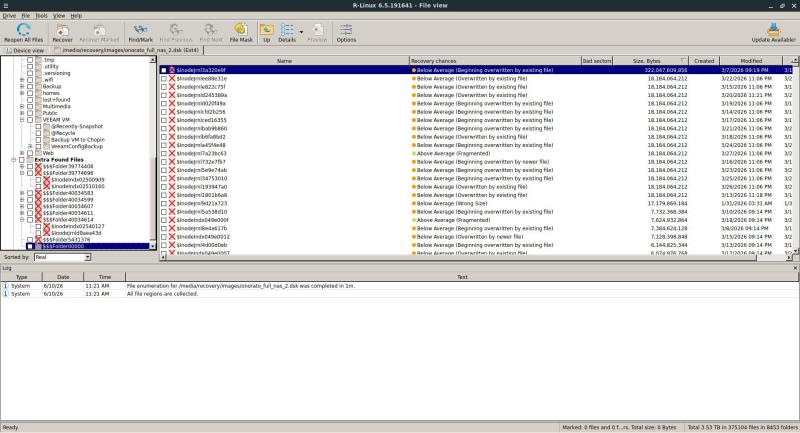
It is also very useful to evaluate the recovery of inodes that have lost their classification and original filename metadata. In such cases, it may still be possible to recover highly valuable data streams from the underlying file content, even in the absence of filesystem-level attribution.
Once the VIB files have been extracted from the NAS, they can be analyzed using VBK Studio. It is important to note that VIB files are incremental backups and do not represent a full file system snapshot. However, they can still be used to extract metadata and file fragments belonging to that incremental delta.
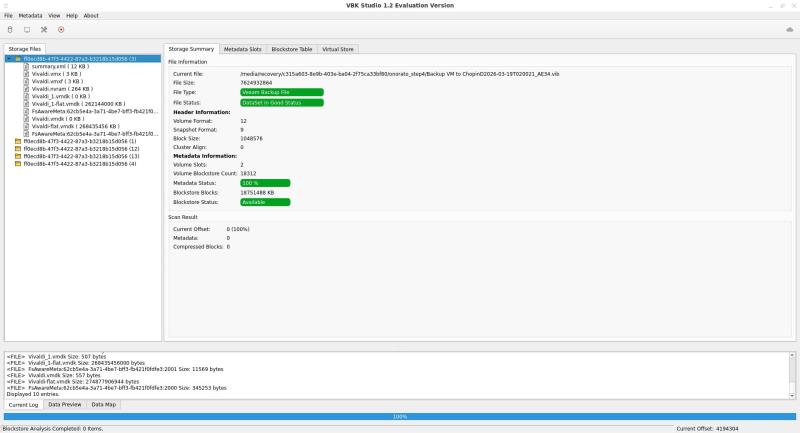
By opening a VIB file recovered from the NAS as a deleted artifact, it is possible to reconstruct the original backup set and enumerate the virtual machines contained within it.
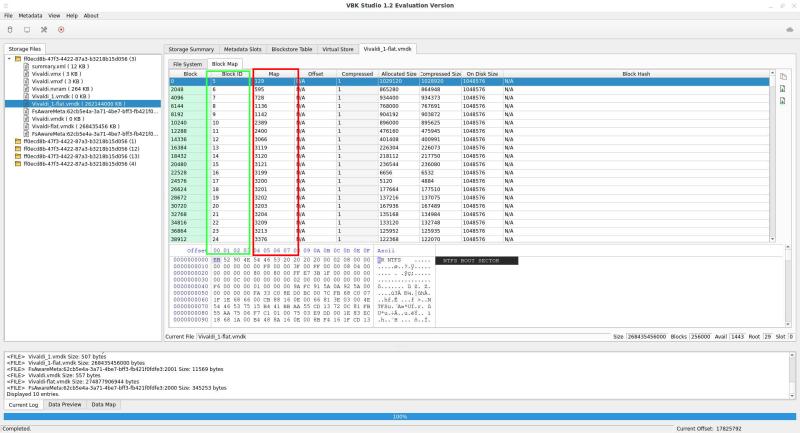
By opening a virtual disk from the datastore inventory, two distinct mapping records can be observed: Blockstore (green) and Datamap (red).
The Blockstore reference is required to locate the corresponding data block within the VIB file, while the Datamap entry corresponds to the block's original location on the source disk. This mapping information is essential for correlating backup data with its original storage layout and for reconstructing file system structures during recovery and forensic analysis.
We are now ready to perform the incremental dump of the blocks associated with the VIB file.
From the BlockMap tab, execute a dump of the virtual disk by selecting "Save Allocated Blocks to File".
VBK Studio will generate a delta file with the same logical size as the original VMDK or source disk image, while populating only those blocks that are actually present in the VIB file. As a result, the output contains only the incremental changes stored within the VIB backup, preserving the original block addressing and layout.
Since the generated file represents only a partial dataset, it should not be expected to contain a complete and consistent file system. Instead, it reflects only the differences captured by the corresponding incremental backup within the backup chain.
Despite these inherent limitations and potential data gaps, the results can be surprisingly valuable and may allow for the recovery of significant amounts of data.
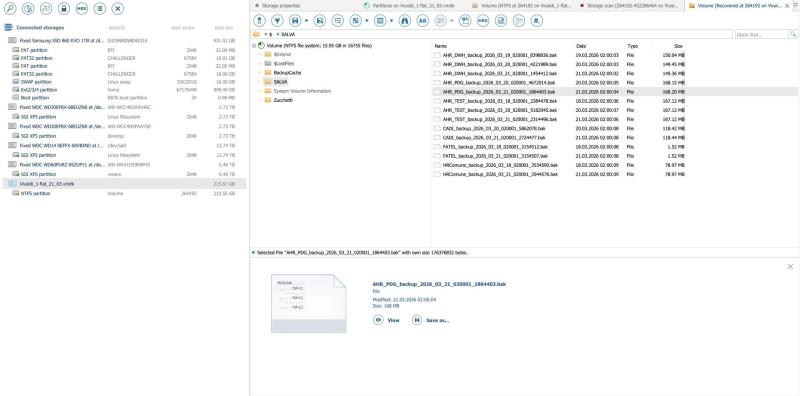
To perform the recovery process, a generic data recovery tool is required. The generated delta image can then be analyzed using standard file system recovery and forensic utilities to identify, reconstruct, and extract recoverable files and data fragments.
The recovery methodologies described in this document demonstrate that, even in cases involving deleted backup files, EXT4 file system corruption, or ransomware incidents affecting a NAS environment, meaningful data recovery opportunities may still exist.
The combined use of EXT4 forensic and recovery tools, together with specialized backup analysis utilities such as VBK Studio, can enable the identification of deleted inodes, reconstruction of backup structures, extraction of incremental backup contents, and recovery of valuable data fragments that would otherwise remain inaccessible.
It is important to recognize that recovery success cannot be guaranteed and depends on several factors, including the extent of file system damage, data overwrites, backup chain integrity, and the condition of the underlying storage media. Nevertheless, even partial recoveries can provide critical information, restore important files, or facilitate further forensic analysis.
For this reason, all recoverable artifacts—including orphaned inodes, unnamed files, fragmented data streams, and incremental backup records—should be carefully examined and validated. A systematic analysis of all available evidence often maximizes the likelihood of recovering useful data and may reveal information that is not immediately apparent through conventional recovery techniques.
In conclusion, a structured forensic approach, combined with specialized recovery software and thorough validation procedures, can significantly improve the chances of recovering data from damaged, deleted, or ransomware-affected backup repositories. While complete restoration may not always be achievable, the potential value of the recovered data frequently justifies a comprehensive recovery effort.

A quick guide to starting using vbk recovery and estimating veeam backup file quality

In this article, we examine a ransomware attack carried out by The Gentleman targeting incremental Veeam backups in .vib format.

This article discusses the techniques for generating a single disk image from complex RAID configurations and LVM2 volumes typically deployed on QNAP NAS systems.

Whenever a Veeam backup file suffers from header corruption or partial metadata damage, Veeam typically returns the error message: All instances of the storage metadata are corrupted. This error may appear alarming, but it does not necessarily mean that all backup data has been lost. In this article, we explain what this message actually means, how to diagnose the underlying issue, and the availab

In this case, we address the recovery of a SQL Server backup affected by a DEADLOCK 2026 ransomware, using only the blocks embedded in the incremental VIB file.

If veeam Extract process does interrupt suddendly with Error Failed to export block restore descriptor could be related to a slight metadata corruption. In most of such cases data are still in perfect shape.
Whenever a Veeam backup file suffers from header corruption or partial metadata damage, Veeam typically returns the error message: All instances of the storage metadata are corrupted. This error may appear alarming, but it does not necessarily mean that all backup data has been lost. In this article, we explain what this message actually means, how to diagnose the underlying issue, and the availab
This article discusses the techniques for generating a single disk image from complex RAID configurations and LVM2 volumes typically deployed on QNAP NAS systems.